Configuring Newsletter Sign-Up – the definitive guide

After releasing ‘Qoate Newsletter Sign-Up’ a year ago, recoding it into ‘Newsletter Sign-up‘ and 25.000+ total downloads i’ve been getting quite a lot of questions on how to properly configure the plugin for the various newsletter services out there. I’m not surprised, configuring NSU isn’t quite easy for the non-tech savvy WP users. Time to make things easier by writing a comprehensive guide on how to configure Newsletter Sign-Up, with screenshots!

Downloading and installing Newsletter Sign-up

You can download and install Newsletter Sign-up just like you would with any other plugin. Head over to the WordPress plugin repository, search for ‘newsletter sign-up’ (which should lead you here) and hit the red download button.

Extract the files of ‘newsletter-sign-up.zip‘ into your wp-content/plugins folder and activate the plugin trough your WordPress admin panel. Not familiar with installing WordPress plugins? The WP Codex has a nice article on installing and managing plugins which should help you out.

Configuring Newsletter Sign-up

If you’ve sucessfully installed NSU your plugins page in the WP Admin will look somewhat like this.

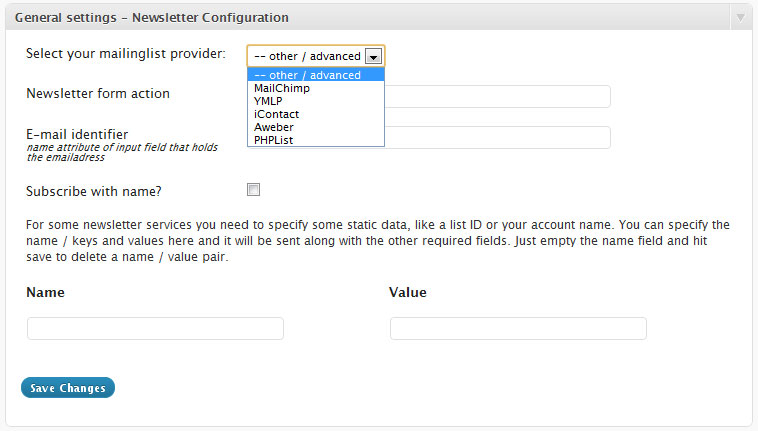
Hit the settings button, which should take you to the Newsletter Sign-Up Configuration page. This page is divided into a few parts, the one that is the most important is also the hardest: General Settings / Newsletter Configuration. These settings are essential if you want to get NSU to work with your newsletter service.

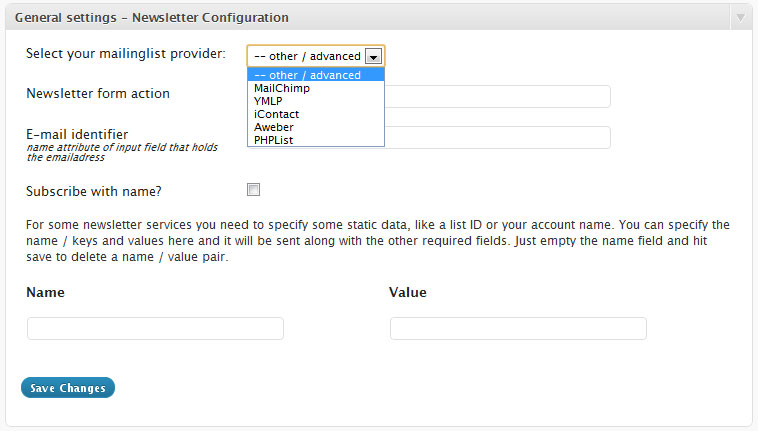
What you fill in here depends on your newsletter service, if you select a mailinglist provider from the select box you’ll see the page change and some more setting fields will apear, or some fields will be autofilled for you to make things a bit easier. You could however just leave the select box at ‘– other / advanced’ and fill in the correct values yourself. If you’re using MailChimp or YMLP you have the option to use their API’s, which I recommend by the way. Let’s start with those two.

Using the MailChimp API

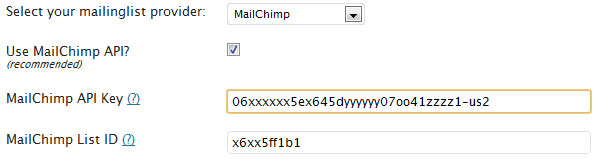
Select MailChimp from the newsletter provider selectbox and tick the checkbox that says ‘Use MailChimp API’. The plugin will now ask you for two values, your MailChimp API key and your MailChimp list ID. If you’re not sure on where to get those just hit the ?-links and you’ll be taken to a page with more information on where to get those.

Using the YMLP API

Select YMLP from the newsletter provider selectbox and tick the checkbox that says “Use YMLP API”. You will now need to provide three values, your YMLP API key, your YMLP username and your YMLP group ID. To get your API Key, just hit the ?-link.

Getting your YMLP group ID is a bit harder. Go to your YMLP dashboard and take a look at the “Your contacts” section. Hover the icons for each of your lists and you’ll notice that each URL ends with &groupid=X. The X is the number you’ll need here. If you only have one default list this number will most likely be 1.

A correctly configured YMLP API should make your NSU configuration screen look somewhat like this.

Other Newsletter providers / custom settings

If you’re using iContact, Aweber, PHPList, ConstantContact or some other newsletter provider, correctly configuring Newsletter Sign Up will be somewhat harder but definitely not impossible!

To understand what we’re trying to do it is important that you understand how NSU works. All newsletter services provide you with a sign-up form in HTML which you can embed on your website. NSU mimics this sign-up request by sending a request to the specified action URL and sending some values along with the request, like the email address of the person who is trying to sign-up.

So, let’s get into it. First, select ‘– other/ advanced’ or your newsletter provider from the select box. You’ll see a few input fields which (for a minimum) ask for a form action and an email identifier.

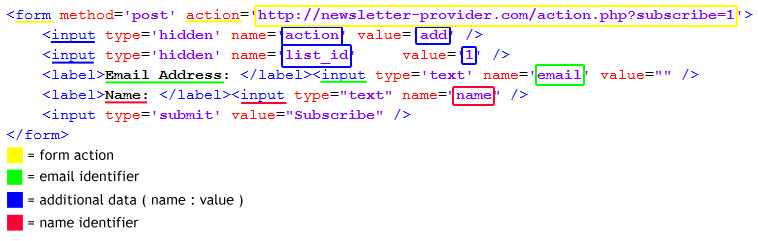
Head over to your mailinglist service and look for a sign-up form which you can embed. You can extract the form action and email identifier from this HTML snippet. Take a look at the following picture to get a better understanding of what values you need. I really hope this picture makes any sense…

Although the snippet in the above picture is overly simplified it should give you an idea of what to look for and which values you’ll need. Basically, all the input fields need to be covered so NSU can send those values along with the request to the form action whenever someone uses NSU to sign-up to your email list.

Testing if Newsletter Sign-Up is properly configured

Testing to see if you’ve properly configured Newsletter Sign-up is pretty straightforward. Using the checkbox at you’re comment form that asks people if they’re willing to sign-up to your newsletter? Just leave a test comment, tick the checkbox and see if it the email adress you used gets added to your email list.

One small note though. Make sure that you’re using an email address that is not already on your list since most newsletter services tend to ignore those requests. Also, be patient for at least a few minutes and check your spam folder!

Still not getting it? Try this.

78 Responses to “Configuring Newsletter Sign-Up – the definitive guide”

Richter Polanco — July 3, 2011 at 10:20 pm

Thanks for the referral Danny! Love the plugin, keep up the good work :)

Tony Darrick Baker — July 5, 2011 at 4:39 am

I updated this tonight and it’s working great! The only thing was that the First name field didn’t show up in my mailchimp subscribers. It looks like I was supposed to enter something after the mailchimp api and list id. Should it have been “First Name” or “mce-FNAME” or “FNAME”

Thanks!

    Danny van Kooten — July 5, 2011 at 5:20 am

    Hi Tony,

    Thanks for mentioning, i’ll update the post. :-) It should be FNAME for MailChimp if you’re storing the firstname. If you’re storing the whole name then it should be NAME.

Ujjwal karmakar — July 5, 2011 at 3:02 pm

i tried this plugin in my wordpress site but it did not works for me. i fillup this field corretly

Select your mailinglist provider: Mailchimp
Use MailChimp API? (recommended)
MailChimp API Key (?) XXXXXXXXXXXXXXX
MailChimp List ID (?) XXXXX

Where to show the sign-up checkbox? WordPress comment form

now everything are shown but whenever given the comment sign up functionality does not working.

    Danny van Kooten — July 5, 2011 at 8:03 pm

    Make sure to check your spam folder and use an email address that is not already on your list.

    Also, does your list store the name of your subscribers? If so, you should specify a name identifier. MailChimp will reject the request if no NAME value is found.

    Hope that helps!

Parley — July 5, 2011 at 3:37 pm

Thank you for this my form is now working. Now if I could get it to look like your end of post sign-up form.

Nico — July 5, 2011 at 9:22 pm

I’m trying to add the plug in, but is there a way to show the form without the widget? Something like this, for example:

<?php if (function_exists(‘akpc_most_popular’)) { ?>
<h2>Most Popular Posts</h2>
<ul>
<li><?php akpc_most_popular(); ?></li>
</ul>
<?php } ?>

Thanks!

    Danny van Kooten — July 6, 2011 at 5:46 am

    Hi Nico,

    There is, you can call <?php if(function_exists('nsu_signup_form')) nsu_signup_form(); ?> from your theme files to show the sign-up form.

    Also, there’s the shortcode [newsletter-sign-up-form] to embed a sign-up form in your posts or pages. :-)

Jeff — July 6, 2011 at 7:58 am

Nice plugin.. Just wondering how to set an email attribute identifier when using mailchimp – I don’t seem to have that option so that it can recognise where to get the email address from when using a checkbox on another form.. so that part isn’t yet working for me..

thanks again

    Jeff — July 10, 2011 at 9:21 am

    Is there any chance you will respond to my query Danny?

      Danny van Kooten — July 10, 2011 at 9:27 am

      Sure thing Jeff. I’m afraid I don’t fully understand your question though. Have you added a checkbox to another form manually?

        Jeff — July 10, 2011 at 9:38 am

        Thank-you.. Yes I have outputted this in the form of another plugin (Fast Secure Contact Form):

        The other plugin is for a contact us form rather than comments, etc… the checkbox is displaying correctly but I am wondering how it can detect the id of the user’s email so upon submitting the form it can grab the email (and send it to mailchimp in my case).. hope this is clear

        _thanks again

        Jeff — July 10, 2011 at 9:40 am

        sorry this is the php that was escaped form the previous comment:

        if(function_exists(‘ns_comment_checkbox’)) ns_comment_checkbox();

        Jeff — July 12, 2011 at 7:50 am

        I’ll assume that this plugin doesn’t allow for the checkbox feature.

Ben — July 8, 2011 at 6:17 am

Hai i am using “Newsletter Sign-Up” plugin in my wordpress project..

In my mail-chimp form Email,Firstname,Zip,Birthday,Gender are reqiired fields…

Using Registration form of wordpress i signup in Newsletter…

My wordpress registration form contain all the above required fields…

But when a new user register only Email,Firstname correctly entered in Mail chimp database..

How can i add the other fields with correct data….

    Danny van Kooten — July 10, 2011 at 7:39 am

    Hi Ben,

    Hmm.. This isn’t quite possible yet although it raises some idea’s for me. I’m going to look into implementing this, now on to find some more spare time.

dharma — July 9, 2011 at 7:08 pm

hi,

is there any way to register given mail address as a new user?

i mean, what i want is when somebody sign-up for mail listing i also want it to register as a new user to wordpress, is it possible??

thanks

    Danny van Kooten — July 10, 2011 at 7:40 am

    Hi Dharma,

    I’m afraid this isn’t possible and most likely this won’t make it into NSU as a feature. You could however inverse the process, add a checkbox to your registration form and users who sign-up to your WordPress blog will automatically sign-up to your mailinglist.

      dharma — July 10, 2011 at 11:09 am

      well, i add the check box to registartion page i guess it will do it.

      thanks for the plugin and quick reply.

Oliver — July 12, 2011 at 3:47 am

Where do go to style this form?

I don’t know how to use the shortcode

I’m currently using the following code:

Oliver — July 12, 2011 at 3:48 am

I just want everything to be transparent and borderless (including the button).

    Danny van Kooten — July 13, 2011 at 5:42 am

    Hi Oliver,

    You can use plain old CSS to style the form. The form has some unique selectors that you can use. If you’re not at home with CSS i’m afraid you’ll have to hire someone to do it for you, it won’t take long for a webdesigner to add some style rules. Good luck!

Demjac — July 13, 2011 at 10:28 pm

where do I change the color of the sign up button?

BaliDave — July 19, 2011 at 9:11 am

I’m using PHPList and would like to use this with WP, but wonder if NSU can handle:
– multiple newsletters (user can select one or several)
– multiple attributes for the user, e.g. first name, last name, city, …
– menu selectable attributes for the user,e.g. the country of the user, the state, …
I know PHP but would like to avoid hacking NSU unless needed.

Adim Subedi — July 26, 2011 at 4:28 pm

Hello,

Currently I am using the plugin in localhost, but with most of the configuration I am not getting the name and the email on my mailchimp list as subscriber. I am using widget of the plugin.

BaliDave — July 28, 2011 at 11:50 pm

Actually now I’ve changed my setup and am not using WP at the top, so don’t need NSU now.

Bill — July 31, 2011 at 9:52 pm

Thanks, setting up now. Wish me luck.

swapnil jaiswal — August 3, 2011 at 1:24 pm

Hi,
Thanks a lot . this plugin has been a great help in solving my problem.
Keep up the good work!
:)

Curtis F — August 8, 2011 at 2:41 pm

Hi Danny,

Thanks for the awesome plugin. I am also planning on making use of the WYSIWYG Widgets plugin which is also awesome!

In the Newsletter Sign-Up Settings page it’s stated that you can easily edit your widget’s sign-up form text by installing the WYSIWYG Widgets plugin alongside this plugin. I was hoping you could clarify how this is possible.

I haven’t found any way to easily edit my widget’s sign-up form text with both plugins installed.

    Danny van Kooten — August 17, 2011 at 5:42 pm

    Hi Curtis,

    Sorry for the delayed response. You can install WYSIWYG Widgets alongside Newsletter Sign-Up. Then, whenever you click the widget text fields the visual editor that also pops up for WYSIWYG Widgets should pop-up. If things are not working for you, please drop me a line trough my contact form. I plan on changing a thing or two to make things way more customizable.

    Kind regards, Danny.

Regal Spri — August 11, 2011 at 7:38 pm

Hi,

I just added this plugin. It works great except the First and Last Name values are not being stored in MailChimp. I’m not sure why this is happening considering my test comments have the Name field filled in. Is it something to do with the Name Identifier? Please advise.

    Danny van Kooten — August 17, 2011 at 5:40 pm

    Most likely it has. Make sure that you pick the right name identifier, or MailChimp won’t recognize the name from the data the plugin sends to it. Take a close look at the above post on how to find the correct name identifier.

Claire — August 12, 2011 at 1:44 pm

Is it possible to add an initial value to the email entry area

    Danny van Kooten — August 17, 2011 at 5:38 pm

    Hi Claire,

    Not yet, but it’s an idea i’ve now heard multiple times. I’ll look into it ASAP!

Adrian — August 12, 2011 at 7:56 pm

Is there a short code that’s used to add email sign-up form to post?

Thanks.

    Danny van Kooten — August 17, 2011 at 5:38 pm

    Hi Adrian,

    Yes there is: [newsletter-sign-up-form].

Greg Back — August 15, 2011 at 1:02 am

Hi Danny,

I am using the plugin as a widget for users to sign up for the newsletter, but whenever i enter an email it doesnt get populated to my list.

I am using mailchimp, I entered the API key and list ID as directed, but when I watch the POST in the net panel of firebug,the post looks correct but the response is just the html of my site. It also seems like it is getting posted to mailchimp because under the API calls tab I can see new requests. Still it does not populate!

I would appreciate any help or any suggestions, perhaps there is something i need to change in mailchimp, though from reading your other responses I am already using only one input field for email on my list form.

Mike — August 24, 2011 at 9:25 pm

Hi danny,

First off thanks for the plugin,
I really like the functionality of it but I’m having little problem.

The plugin works fine to a point, it adds subscribers to mailchimp but doesn’t work with the wysiwyg, the wysiwyg works on it’s own, the edit window pops up as soon as I click a field but when I click into the plugin nothing happens.
Also there’s a little quirk in the wp-admin panel the wp-admin text & links that’s at the bottom of every screen:
(Thank you for creating with WordPress. • Documentation • Freedoms • Feedback • Credits)

Is half way up the screen? I’ve added a pic so you can see.
http://img11.imageshack.us/img11/7757/nsuissue.jpg

I’ve tried reinstalling and tried on another theme but still get the same issues? is it maybe a host issue, i’ve looked around and I can’t see anyone else with this problem.

I’d really like to get this sorted as I really want to use this it’s exactly what I’m looking for.

Thanks for all your work danny,
cheers.

Claire — August 29, 2011 at 6:25 pm

Hi Danny, brilliant thanks, I have bought you a beer to show my appreciation. Keep up the good work.

Barb — August 31, 2011 at 3:48 am

Hi,

I love the idea of the plugin, especially for the comment check-box. I have figured out the “form” and “email” fields for Feedburner. The button shows up, so does the comment when I hit submit, but the sign-up form and/or any confirmation emails never show up. It looks like it doesn’t trigger the sign up, what could be the problem.

Thank you!

Barb

shawn — September 3, 2011 at 4:32 pm

Hey Danny -

I have seen plugin similar to this that charges $$$ glad I found yours :)

Thanks for the hard work.

Shawn

Nick — September 5, 2011 at 11:35 am

Thanks for the great plugin!

I’m using the contact form 7 plugin – is there a way to enable the “sign up for my newsletter” checkbox in that form, just like in the comments?

Thanks,
Nick

    Danny van Kooten — September 5, 2011 at 7:05 pm

    Hi Nick,

    Glad you like it. At the moment there is no functionality that would let you add a checkbox to contact 7 forms. More people asked for this, so it is on my to do list. Now on to find some more spare time!

Social Media Saint — September 10, 2011 at 11:01 am

Is there any way to integrate this to a contact form/enquiry form? I am OK with using any other plugin as well. I also have a Wufoo account that lets you create and publish forms on your website. Thanks for your help! Great plugin.

Jo — September 14, 2011 at 2:48 pm

Hi Danny,

I have installed your plugin fine and it looks great – I would just like it to appear at the top of my sidebar above the loop – would you be able to let me know how to do this – I am new to wordpress and figuring things out gradually!

Many thanks for your help,
Jo

    Danny van Kooten — September 14, 2011 at 6:44 pm

    Hi Jo,

    This kinda depends on your theme. You can add the Newsletter Sign-up Widget as your top widget, but if that doesn’t put the widget at the top of your sidebar your theme has ‘the loop’ hardcoded above the widget area. Hope you’ll figure it out!

Jo — September 14, 2011 at 6:59 pm

OK thanks Danny – yes it must be hardcoded – I’ll figure it out! Cheers Jo

Tom Ewer — September 16, 2011 at 1:02 pm

Hi Danny,

Great plugin – works exactly as I hope it would. Unfortunately, I am having trouble styling it. I note that there are various CSS files within your plugin, but altering the stylesheets seems to make no difference. Can you please advise which classes or IDs I should be targeting in order to change the style of the comments checkbox?

Thank you!

Tom

    Danny van Kooten — October 10, 2011 at 6:06 pm

    Hi Tom,

    Sorry for the somewhat late reply. Have a look at your page it’s source code in order to find the right id’s, every sign-up form created by Newsletter Sign-up gets it own unique #id which you can use to style it. Alternatively, use the class .nsu-form to style the various form elements.

    Example:

    .nsu-form input{ border:1px solid red; }

    It is best practice to add this style to your theme’s style.css (found in /wp-content/themes/your-theme/). Make sure to disable the checkbox on the NSU settings page that says ‘Load some default CSS.’.

    Hope that helps! Cheers!

Erik — October 4, 2011 at 6:59 pm

Danny, is it possible to publish this form in multiple languages as (like in the menu) does not work..

thank you in advance! Great plugin!

    Danny van Kooten — October 10, 2011 at 6:05 pm

    Hi Erik,

    Actually, this isn’t quite possible yet. Are you using WPML? I’ll look into adding support for WPML! :-)

Rob — October 9, 2011 at 11:55 pm

I like that this plug is lightweight, but when someone submits the form, it takes them to my contact page and is asking for a recatpcha. ???

And, I never saw where you answered questions about customizing css for the actual form. Where is the css stored? Is it auto-inserted into the theme’s css?

Thanks,

//rt

    Danny van Kooten — October 10, 2011 at 6:03 pm

    Hi Rob,

    What newsletter service are you using? This problem is known with PHPList if you’re using additional values and not configuring them correctly. You can choose to load basic formatting styles, this loads an extra CSS file in your website’s header. Better would be to add your own styles to your theme’s style.css. This file can be found in /wp-content/themes/your-theme/style.css. All sign-up forms created by Newsletter Sign-up get an original #id which you can use to style it.

    Hope that helps!

    Danny

Erik — October 10, 2011 at 6:20 pm

Hi! Yes using wpml! it is great, would be great if you can look into this! Many thanks!

Dan Upton — October 14, 2011 at 12:22 am

Great plugin, thanks!

I’m getting the sign-up form on my sidebar, but checkbox isn’t appearing in my contact form?

Anyone had this issue?

Dan Upton — October 14, 2011 at 12:28 am

sorry, just saw comments above. please disregard previous comment.

Rob — October 16, 2011 at 11:51 pm

Hey Danny, thanks for looking at my question above. My problem was actually that I had a sign up form in the footer of the Contact Page. Instead of worrying about it, I just took the form off of that one page.

Here’s some other things I couldn’t figure out: Is there a way to show a banner/img in the header, instead of the h4? And, is there a way to control the width of the label inputs? I see an option on mailchimp, but it doesn’t translate on the page, even with custom css turned off. I just don’t want to start changing code on the actual widget without asking.

Harrison — November 19, 2011 at 3:53 am

I am not tech enough to understand what you said and implement:

“Extract the files of ‘newsletter-sign-up.zip‘ into your wp-content/plugins folder and activate the plugin trough your WordPress admin panel.”

Unsure about extracting file into wp-content. I signed up for icontact accoun but have not yet got that going either.

    Danny van Kooten — November 21, 2011 at 10:41 am

    Hi Harrison,

    Installing the plugin goes just like installing any other WordPress plugin. An easier way to install the plugin would be to go Plugins > Add New > Search for “Newsletter Sign-Up” and hit the Install button.

    From there, try following this guide or the configuration extractor to configure the plugin.

    Hope that helps!

    Danny

MacPieter — December 14, 2011 at 9:36 am

Hi Danny,

Love the Plugin, thanks a lot!
But… can I work with it using WordPress 3.3?

Thanks.

Pieter

Zegobelin — December 15, 2011 at 11:36 am

Hi Danny,

I’m using your WP extension for a couple days. And I think that I’ve got a little problem. (I’m using WP 3.3 since Monday)

I put ‘nsu_signup_form()’ in a part off my templates.

It seems to work but my mailingList on Mailchimp isn’t updated at all.

I’m using Mailchimp API, Settings, Checkbox and Form settings seems to be OK. I don’t do anything in the ‘Config Extractor’.

Can I hope for a little help ;)

Thanx for your work!

(excuse my english – I’m a stupid french ^^)

MacPieter — December 15, 2011 at 5:25 pm

Hi Danny,

Can you help me with YMLP?
Can’t get the form right.
Het gaat dan om de checkbox settings en de form settings.
De rest is allemaal goed gelukt: de API code etc van YMLP.

Ik hoor het graag.

Pieter

Joanna — January 4, 2012 at 4:25 pm

Hi Danny,
Great plug-in. Just wondering if it works OK if you use it on two different sidebars – I am using the ‘custom sidebar’ widget and want to have your newsletter plug-in with another plugin on one sidebar and just your newsletter sign-up on another sidebar.
I am new to wordpress so wanted to check before I tried incase I got myself in a pickle! I am probably going to be using mailchimp.

Many thanks for your help.
Jo

Shauntay — February 9, 2012 at 8:01 am

How can I make this work with icontact. I can’t figure out what the form action is.

phil — February 27, 2012 at 6:21 pm

Hey Danny, thanks for your work. However, I can’t make it run with my PHPList-Installation although I have tried a while now and read all posts in the WordPress-Forum. The Problem: The form always takes me to the original sign-up page and re-enters the data there, but doesn’t actually submit the page.

Did you ever see an installation with PHPList which actually works? Most forum-posts I’ve seen report the same problem I have.
Here is my current form: http://vdch.de.dd14120.kasserver.com/ (Bottom of the page).

Thanx for your help!
Phil

lua — March 17, 2012 at 5:08 am

i have successfully installed the plugin and now applied it as a widget on my wordpress project.

the problem is i have fields underneath the subscribe button on my side bar….when i supply values for those fields and click on signup in works fine….but when i try to enter an email value to the subcribe field and click on subscribe it displays a message that

“The feed does not have subscriptions by email enabled”

how do i solve this problem please

Paul — March 21, 2012 at 1:58 pm

Any plans for support for Campaign Monitor?

Eric — March 27, 2012 at 9:02 pm

Hi Danny,

Thanks a ton for the plugin. It is awesome but I’m having trouble using the Y

Eric — March 27, 2012 at 10:14 pm

Thanks for the really cool plugin. I really appreciate your development.

I am having a problem using the plugin with the YMLP api in the sidebar widget.

It looks like its working when I plug in an new email address and submit, but then I never receive a confirmation email to that email address.

I am sure that all of my configuration info is correct so I’m not sure what more to check.

Any help on this would be great! Thanks.

Matthew — May 3, 2012 at 8:24 pm

I have followed the guide, but can’t get it to work with mailchimp, namely the comment box option. I’m wondering if it has something to do with the fact that I didn’t specify anything in the Name/Value fields. I didn’t quite understand how to do that or if I needed to.
Thanks.

Matthew — May 3, 2012 at 8:58 pm

Disregard. I’m a moron. Thanks for the awesome plugin.

Patrick — July 6, 2012 at 9:13 pm

Hello,

I use YLMP and I have a problem to add the fields ‘name’ in my list

I put ‘author’ is the name of the fields of my wordpress comments but the name never appears in the fields of my list

Nice job the plugin.

Best Regards
Patrick

    Danny van Kooten — July 21, 2012 at 5:59 pm

    Hi Patrick,

    Not sure if you’ve figured it out yet but please post any support questions you have in the WordPress support forums. I like to keep all support questions (and answers, obviously) at one place so other people can benefit from the answers. Saves me time too.

    Thanks!

Jim Camomile — December 3, 2012 at 11:54 pm

Great Job on this! We are starting to use this plugin instead of other Mailchimp Subscription widgets that are out there.

I noticed that you have added some functionality to integrate groups through Mailchimp. It seems like this only goes so far as to make the form automatically sign each person up for all of the groups that are listed in the comma delimited list in the plugin admin for mailchimp api.

I made a few alterations to the code so that the groups added in the admin are then listed on the form with checkboxes. This allows the registree to choose his/her groups. Following is my code and notes in case it might help you in your next version, though your PHP will almost certainly be more elegant:

——————————————-

Newsletter signup change notes
Jim Camomile – 12/03/12

Goal of changing the code:

Add the groups checkboxes to the form and make the form register subscriber only to those groups

Changes

1. change form code in frontend/NewsletterSignUp.php lines 563ff

– IF groups have been added in admin, they will appear in checkboxes

——————————————

// Added by Jim Camomile for Adding Groups
if(isset($opts["mailinglist"]['mc_use_groupings']) && $opts["mailinglist"]['mc_use_groupings'] == 1 && !empty($opts["mailinglist"]

['mc_groupings_name'])) {

$output .= ”;
$output .= ”.$opts["mailinglist"]['mc_groupings_name'].”;

$groupsarray = explode(‘,’,$opts["mailinglist"]['mc_groupings_groups']);
$thegroups = $groupsarray;
$thecount = 0;
foreach($thegroups as $thegroup){
$thecount++;
$output .= ”;
$output .= ”;
$output .= ”.$thegroup.”;
$output .= ”;
}
$output .= ”;
} // end if there are mailing list groups – by Jim Camomile

// End Adding Groups

——————————————

2. added code to the form processor frontend/NewsletterSignUp.php lines 243ff

- gets the values for the groups which were submitted in the form. If group values exist from the form post, these are used instead of the default

sting in $opts['mc_groupings_groups'].

——————————————-
// Jim Camomile added the following to change groups that are added for registration
$getgroups = $_POST;
$mygroups = array();
foreach ($getgroups as $key => $value){
$gotgroup = substr($key,0,5);
if ($gotgroup==’group’){
$mygroups[] = $value;
}
}
if ($mygroups){
$opts['mc_groupings_groups'] = implode(‘,’,$mygroups);
}
// print_r($opts['mc_groupings_groups']);
// exit;

// end added by Jim

——————————————-

Stu — December 12, 2012 at 1:56 pm

Hi Danny

I really like the sound of your plugin but I’m looking to use “contact form 7″ plugin as our main contact form. Is there a way to enable the “sign up for my newsletter” checkbox in forms created by “contact form 7″ ? I see in your comments September 5, 2011 that it was on your to-do-list so just wondering if this is now possible?

Thanks very much

George — March 8, 2013 at 2:02 pm

I’ve installed your plugin and set it up to work with our MailChimp account, but the check box is not showing. Is there an integration problem with Jetpack comments? Thanks in advance your your response.

    Danny van Kooten — March 10, 2013 at 12:41 pm

    Hey George, it can be your theme or it can be Jetpack, maybe the comment hook is missing? Actually I have never looked into Jetpack comments but maybe the FAQ is able to help you out? It has instructions in it on how to add the comment hook manually.

    As soon as I find myself with some time I’ll dive into Jetpack myself too. Hope you’ll be able to figure it out!

    Danny

Leave a Reply

Pallet Tafels